Latest Version 2.0.0Wed Sep 23 2026
Thank you for playing Taiko no
Tatsujin Pop Tap Beat!
The game has been updated
(Ver.2.0.0).
[Regarding a Current Issue]
We have tested and confirmed an
issue where the game crashes when
a player launches an older version
on another device using the same
account after having played
on Version 2.0.0.
We recommend for all players who
play on multiple devices to update
all their devices to the latest
version before continuing their
gameplay.
We sincerely apologize for any
inconvenience this may have caused
our players.
To celebrate the 5th anniversary of
Taiko no Tatsujin Pop Tap Beat,
and the 25th anniversary of Taiko
no Tatsujin, we've released a
major update!
We hope you enjoy the all-new
Taiko no Tatsujin Pop Tap Beat!
Create and Share Playlists!
• Added a new Playlist feature.
Add all your favorite songs to a
playlist and create your own custom
setlist.
Add the same song at different
difficulties, mix in random picks
to suit your style, and more.
Try out all kinds of
combinations!
• Share and import playlists using
2D codes.
Convert your playlist into a 2D
code to share it with your friends.
When you receive a 2D code, import
it into your own playlists.
• Added Hot Picks Playlists.
Explore Hot Picks for
recently added songs, recommended
tracks, and more.
*Songs marked as Favorites in
previous versions have been
moved to the Favorites
playlist.
Play Your Playlist Nonstop in Medley Mode!
• Added the new Medley performance
mode.
Play songs from your playlists and
Hot Picks one after another
without stopping.
Choose between two modes: Short
Medley, which lets you quickly
play highlights from each song,
or Full Medley, which lets you
play every song in full.
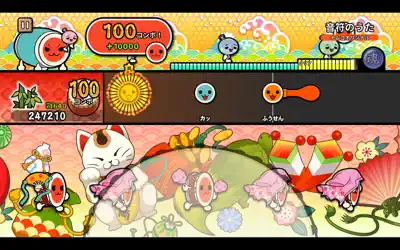
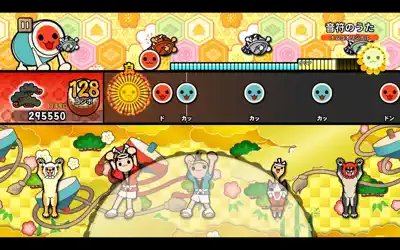
Taiko Mode Has Been Refreshed!
• Improved Taiko Mode screen!
With new backgrounds and a
progress gauge that shows how far
you've played, the gameplay screen
is more fun than ever.
• Added 120 FPS support for
Taiko Mode (supported devices only).
On supported devices, enjoy
smoother Taiko Mode with 120 FPS
visuals.
*You can enable this under Game
Settings 〉 Frame Rate Settings.
Customize with Nameplates, Mini
Characters, and Titles!
• Added Nameplates, Mini
Characters, and Titles.
Choose from the three new tabs on
the Costumes screen and
personalize your look however you
like.
• Earn items from the Yellow
Treasure Box.
You can obtain Nameplates and Mini
Characters from the Yellow
Treasure Box, which opens after
collecting three stamps earned by
completing Medleys.
Titles are awarded for completing
various objectives.
• Added Vibration support (iOS
only).
On iOS, your device will vibrate
when you hit notes successfully.
*You can change this under Game
Settings 〉 Vibration Settings.
• Added English voice support.
English in-game voiceovers have
been added.
*You can change this under Game
Settings 〉 Voice Language
Settings.
New Songs Added
""Mickey,"" released in 1982, is
widely considered one of the
world's most famous cheerleading
songs.
Enjoy its irresistibly catchy
melody, the kind that makes you
want to move, now in Taiko no
Tatsujin!
And to celebrate the 25th
anniversary of Taiko no Tatsujin,
we've added 10 iconic songs from
the series!
We hope this update lets you
experience the history of Taiko no
Tatsujin as well.
Ojamajo Carnival!!
Mickey
Nijiiro Yumeiro Taikoiro
HIBIKE! Taiko no Tatsujin
KUMO MADE TODOKE!
BOUKEN BIYORI
Touch You!
DOKI DOKI*Don-chan SAWAGI
Choujikuu Adventure
FURIFURI NORINORI